
1099 Per-Line Control for Business Central Documentation
Overview
Born from a customer request, the “1099 Per-Line Control for Business Central” module for Microsoft Dynamics 365 Business Central is now generally available. This module is a very small, very light weight module to allow for granular control of the attribution of line items to the 1099 form on a per-line basis at the time of entry. If your organization has a requirement to parse out specific amounts between (for example) 1099 NEC versus expense reimbursement, this module allows the accounting team to fine-tune the 1099 amount right when the document is entered.
1099 Per-Line Control for Business Central Core Principles
The core principles of this module adhere to:
- Where possible, rely upon Dynamics 365 Business Central’s native 1099 processing
- Interact with data in the least manner possible, and
- Differentiate between posted and unposted transaction records inside the module itself.
Adhering to these principles has created an auditable and very light-weight module to accomplish a single task: making the 1099 reconciliation at year-end easier.
Security
There is only one additional security role involved in this module, for administration purposes. All other functionality is available to any user with access to the associated windows.
1099 Per Line - Admin [EVG 1099PL ADMIN]

This is the only permission set that is user-facing for the 1099 Per-Line module. The only control that it provides is access to the configuration screen. All other functions are embedded in basic user access, and therefore controlled by operational Business Central security.
Basic Navigation
The only navigable window in the 1099 Per-Line module is the configuration screen. To get to it, go to “Tell Me” and type in “1099PL”, then select “1099PL Configuration”:
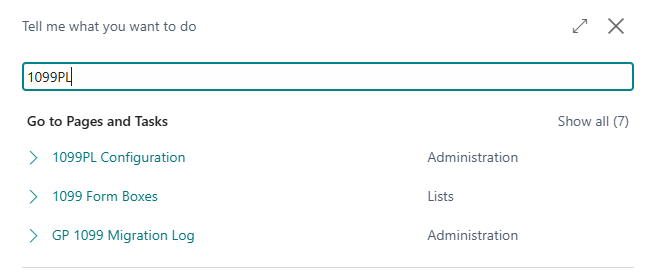
The 1099 Per-Line Configuration window controls only certain emission behavior for telemetry purposes.
Enable Telemetry: this setting controls whether telemetry is collected from the module. This is set by company, by environment. See the telemetry section for an explanation of the data being sent to the developer.
Enable Analytics: this setting controls whether extended telemetry information that helps the developer understand usage patterns is sent to the developer. See the telemetry section for an explanation of the data being sent to the developer.
Operation
The only impacted purchase document types are purchase invoices and purchase credit memos. The 1099 Per-Line module does not interact with any other type of purchase document. When a user is entering a purchase document, there is one new entry field available, and one (read-only) total field that appears on the main face of the window:
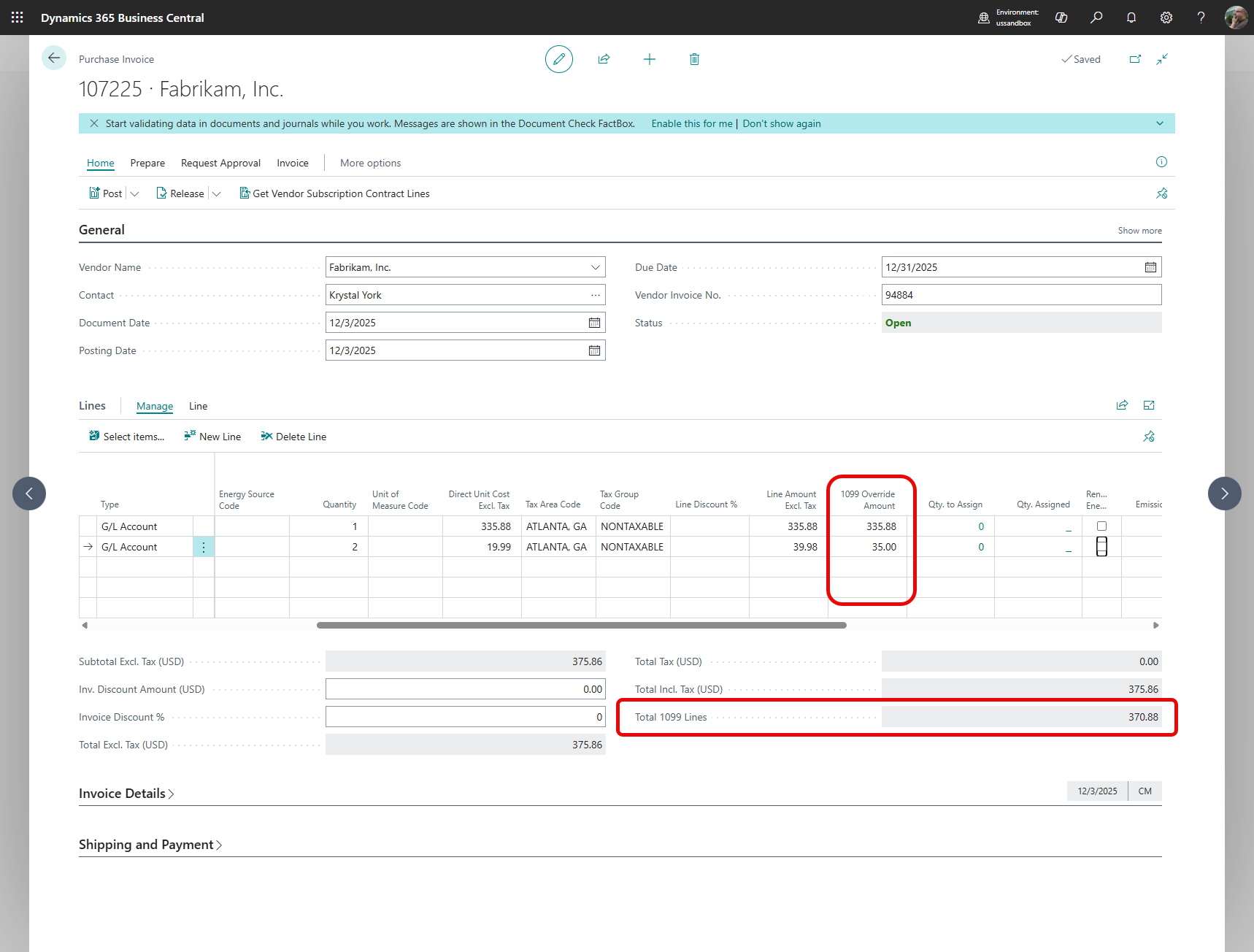
The column “1099 Override Amount” should populate with the line amount while the user is entering information. The user then has the opportunity to claim any amount attributable to 1099 forms that is less than the total line amount. The system will apply that amount against the period, form and box number selected for the vendor. When the numbers in this column change, the “Total 1099 Lines” field also changes to show how much the 1099 claim on this invoice - in total - will be.
Supported posted purchase documents likewise have these fields, including the amount(s) at the time of posting:
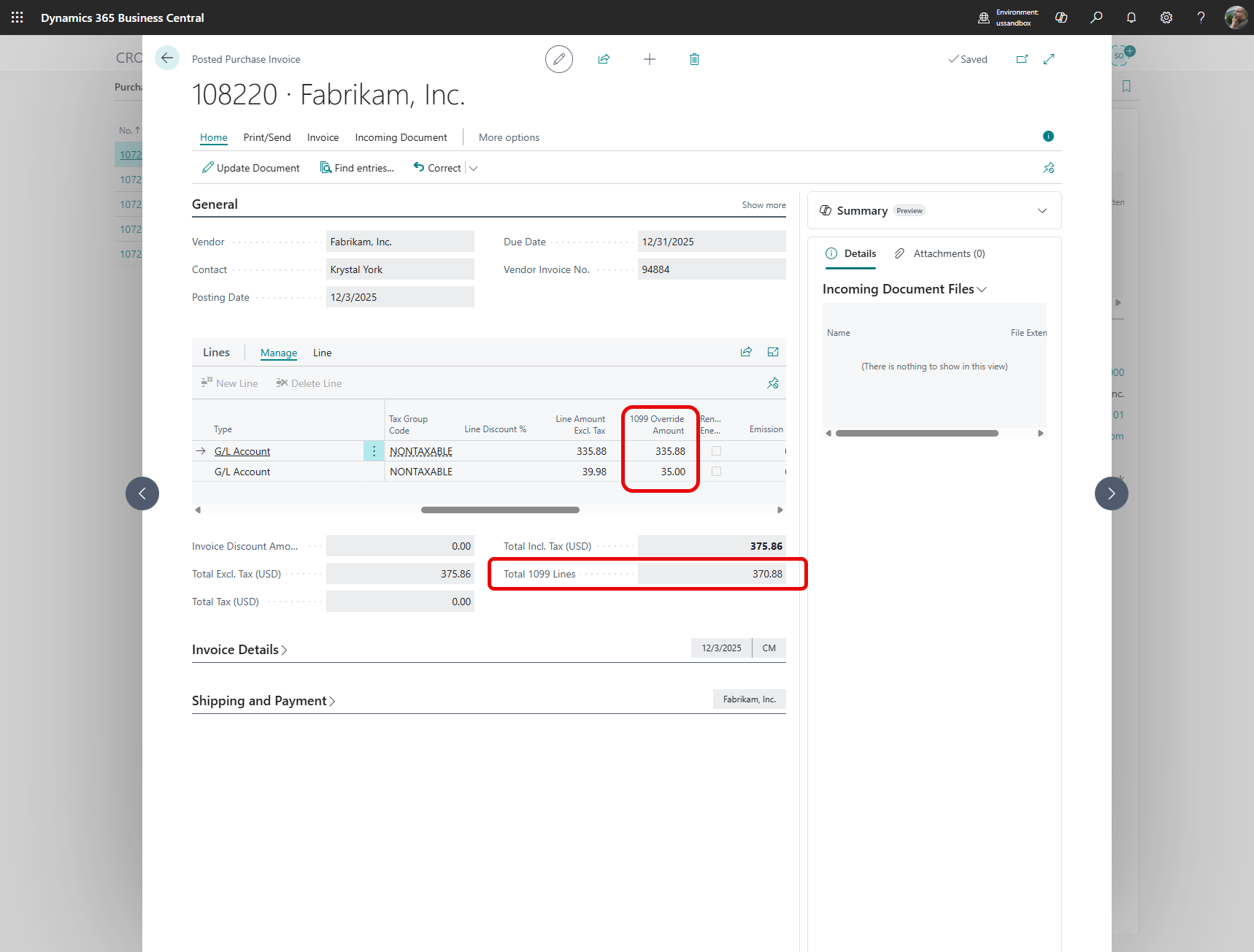
Note that the fields on the posted invoice cannot be changed. In order to make any changes to posted 1099 information, the user will have to use the IRS Forms module’s methodology of changing values.
SOX 302 / NI 52-109 Control Narrative
This document describes system behavior intended to support management certification under SOX Section 302 and NI 52-109. It does not constitute management certification or auditor attestation.
Control Objective
The objective of this control is to ensure that 1099-reportable amounts recorded during document posting are accurate, intentional, traceable, and subject to deterministic system control, such that management can reasonably certify the completeness and accuracy of 1099 disclosures under SOX Section 302 and NI 52-109.
This control addresses the risk that 1099 amounts may be misstated due to user error, inconsistent application, or undocumented system behavior during posting.
Control Scope
This control applies to the posting of documents that result in 1099-reportable vendor ledger entries within Microsoft Dynamics 365 Business Central when the 1099 Per-Line Control for Business Central by Evergrowth Consulting (the “Module”) is installed and enabled.
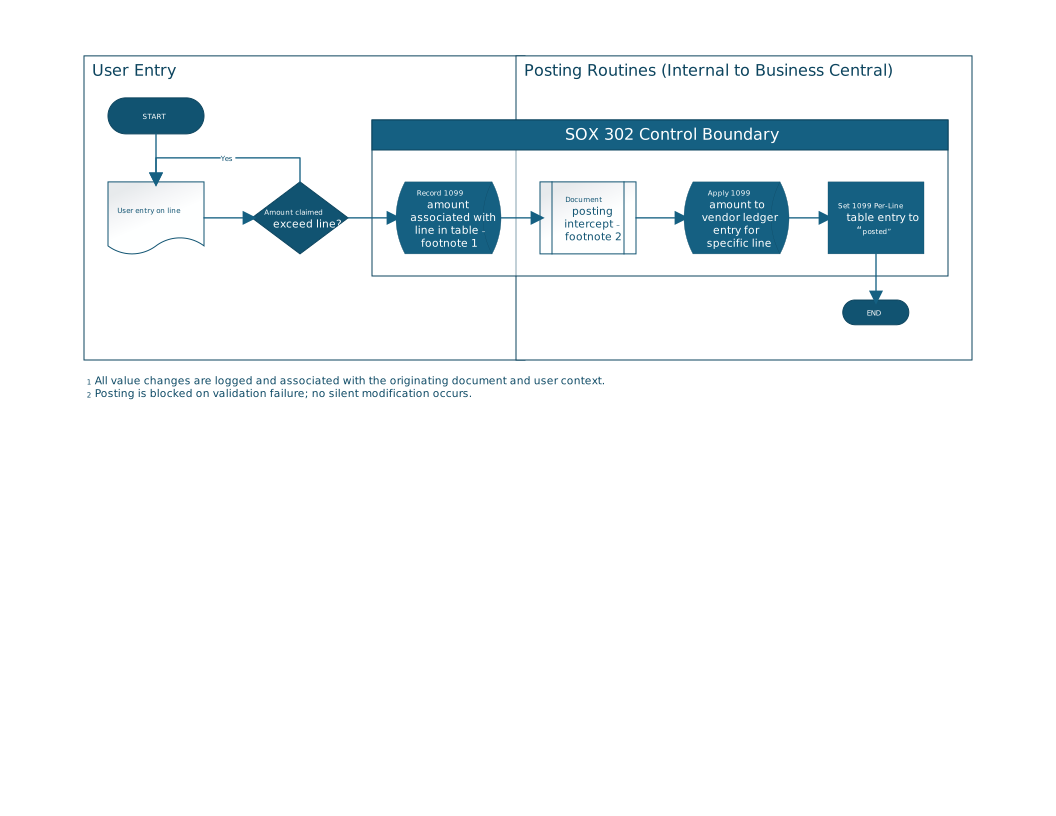
The control boundary begins after user entry is complete and continues through document posting and ledger entry creation, as depicted in the accompanying flow diagram. User data entry prior to posting is outside the scope of this control.
Control Description
When a document containing 1099-relevant lines is entered, the Module evaluates whether the 1099 amount claimed for a given line exceeds the underlying line amount.
If the claimed amount exceeds the line amount, the user is alerted to this by a blocking error that prevents recording the amount.
If the claimed amount does not exceed the line amount, entry and posting proceed using Microsoft Dynamics 365 Business Central (“Business Central”) behavior.
The Module performs the following actions within the posting routine:
- Record Intended 1099 Amount: The claimed 1099 amount is recorded in a dedicated per-line table and associated with the originating document and document line.
- Intercept Document Posting: During the posting process, the Module intercepts the posting routine at a defined extension point to evaluate the recorded 1099 amount.
- Apply 1099 Amount Deterministically: The recorded 1099 amount is applied to the resulting vendor ledger entry for the specific document line.
- Finalize Posting State: Upon successful posting, the per-line 1099 record is marked as “posted,” preventing reuse or modification.
The posting process completes only if all validation checks succeed.
Preventive and Detective Aspects
This control operates as both a preventive and detective control:
- Preventive: Posting is blocked if validation fails. The system does not permit silent or partial application of 1099 amounts that the user did not enter.
- Detective: All value changes performed by the Module are logged and associated with the originating document and user context, enabling review and reconciliation.
Control Characteristics
- Deterministic: Given the same inputs, the control produces the same output.
- Non-discretionary at Posting: Once posting begins, user discretion ends and system logic governs all value changes.
- No Silent Modification: The system does not alter 1099-reportable values without either completing posting successfully or halting posting with an explicit validation failure.
- Traceable: All applied 1099 amounts can be traced from vendor ledger entries back to the originating document and per-line record.
Evidence and Auditability
Evidence supporting the operation of this control includes:
- Posted vendor ledger entries containing applied 1099 amounts
- Corresponding per-line 1099 records marked as “posted”
- System logs associating value changes with document identifiers and user context
This evidence is retained in the system and is available for management review and auditor inspection subject to Business Central’s internal procedures and company configuration.
Management Reliance
Management relies on this control to ensure that 1099-reportable amounts reflected in vendor ledger entries are complete, intentional, and appropriately applied. Based on the design and operation of this control, management believes it provides reasonable assurance in support of certification under SOX Section 302 and NI 52-109.
Diagram
PDF Version
A PDF version of this control narrative is available here:
Download the Management Control Narrative
Release Notes
1.0.0.9516 - 2026-01-19
- Initial release
1.0.1.9525 - 2026-01-29
- Add exclusion for unchecked “1099 Liable” column
- Add exclusion for vendors without 1099 configured
1.0.2.9536 - 2026-02-09
- Security fixes and code stability changes