
Business Central Build Tasks for Azure Devops
Overview
2025-06-10 Version 0.1.8: NO LONGER WINDOWS ONLY!
Proud to announce that this extension is NO LONGER Windows agent dependent!!!
This Azure DevOps extension provides build pipeline tasks for Microsoft Dynamics 365 Business Central AL projects. It enables full pipeline-based compilation, dependency acquisition, and VSIX compiler management using custom tasks.
This extension is usable on both Ubuntu and Windows based agents




Features
Platform Independent
- Operates on both Ubuntu and Windows agents
✅ Get AL Compiler
- Downloads the latest version of the Business Central AL compiler from the Visual Studio Marketplace
- Extracts and sets pipeline variables for reuse
✅ Get AL Dependencies
- Retrieves extension dependencies from
app.json - Optionally adds default platform dependencies
- Retrieves extension dependencies from
✅ Build AL Package
- Compiles
.appfiles usingalc.exe - Fully configurable path and output control
- Compiles
Installation
- Go to your Azure DevOps organization.
- Navigate to Organization Settings > Extensions.
- Install the shared extension: BCBuildTasks from Evergrowth.
- Tasks will become available in the Build category within pipeline designer.
Other Requirements
Azure AD App Registration
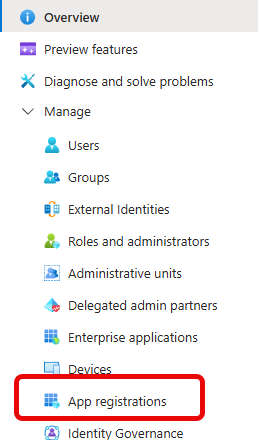
An application registration must be made in Azure Entra. Go to https://portal.azure.com and go to Microsoft Entra ID (or on older Azure Portals, Azure Active Directory). Select App registrations from the menu:
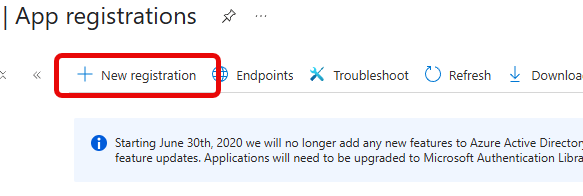
Next, go to “New Registration” at the top of the window:
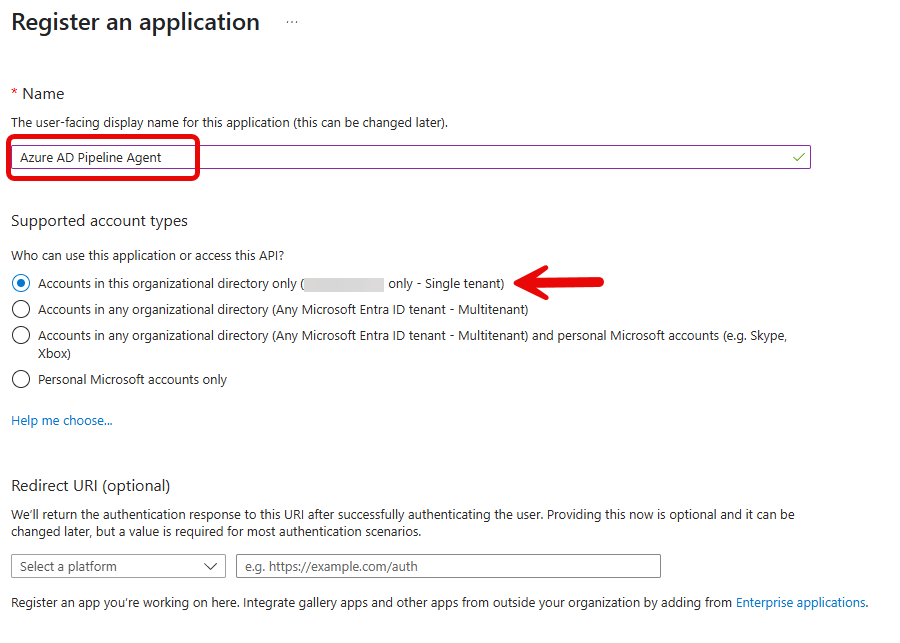
Provide a username that will make sense in your Entra environment. This user does not require a redirect or any other information. This should be a single tenant account as it should not be available anyplace else:
Once you’ve saved that, you will be taken to the registration’s screen:
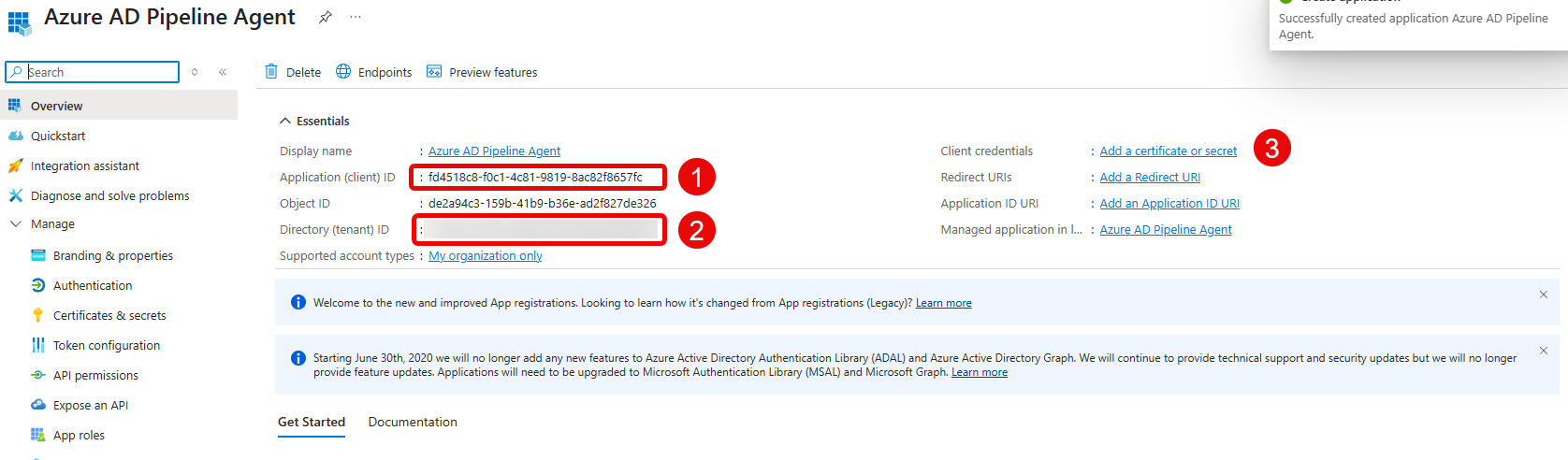
References:
- this is the
ClientIdused in this extension, or the application id. - this is the
TenantIdused in this extension; it is your tenant id. - click on the blue link here to set up a client secret. In that window select the “Client secrets” tab, and select “New client secret” (image shown as #1 in screenshot AFTER the one below.)
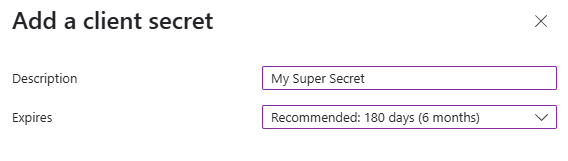
The settings are up to the user. The name is informational only and not used by the pipeline. The length of time is likewise up to the user. Save that, and the key will appear on the next screen:
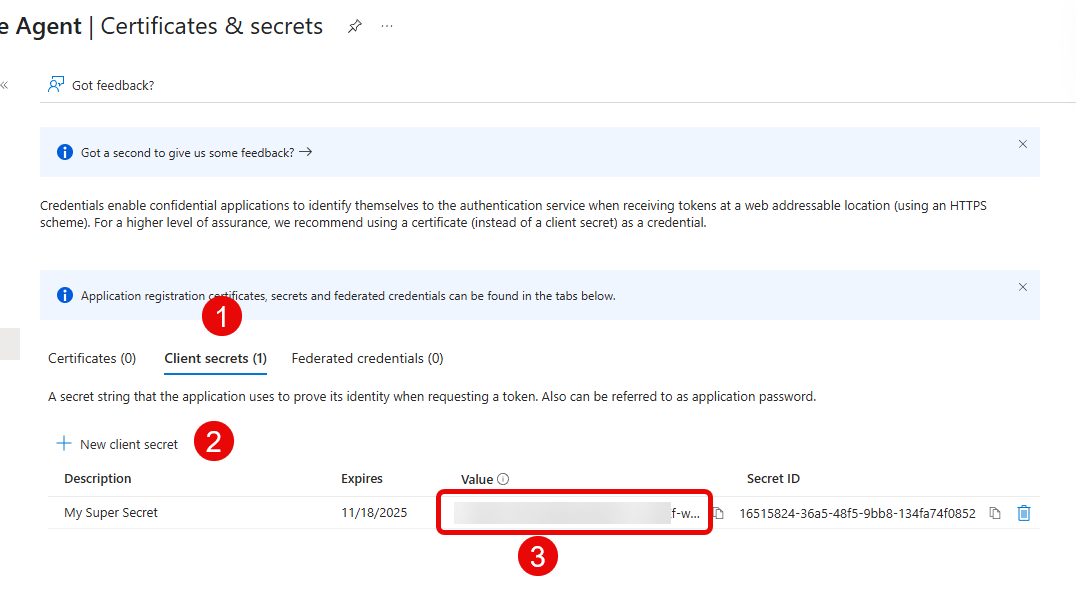
References:
- the “Client secrets” tab referred to above
- the “New client secret” button referred to above
- when a client secret is set up, it will appear here. This is
ClientSecret. MAKE SURE you copy this to a secure location. This is the only time you will be able to do so.
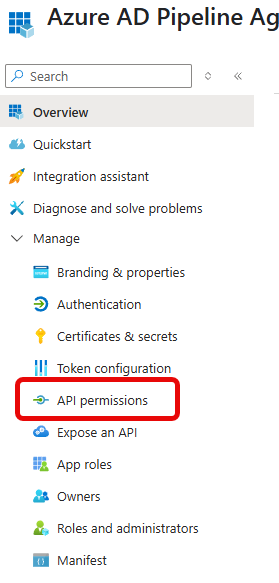
Once finished on this screen, go to “API permissions” in the menu on the left:
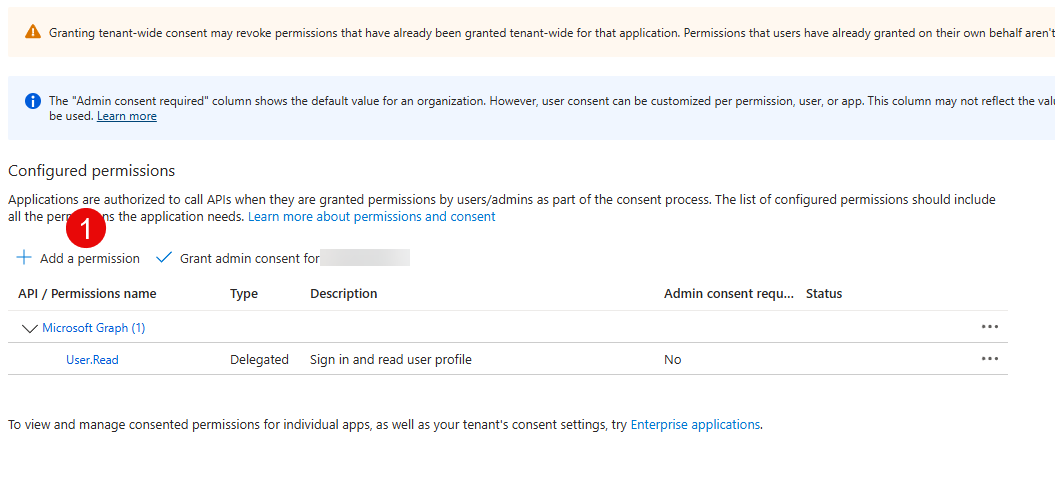
Click on “Add a permission”:
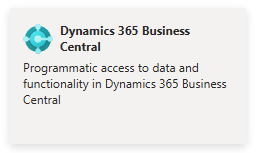
Find the Business Central API tile and click it:
Select “Application permissions” from the two options presented, and select the following permissions (minimum required):
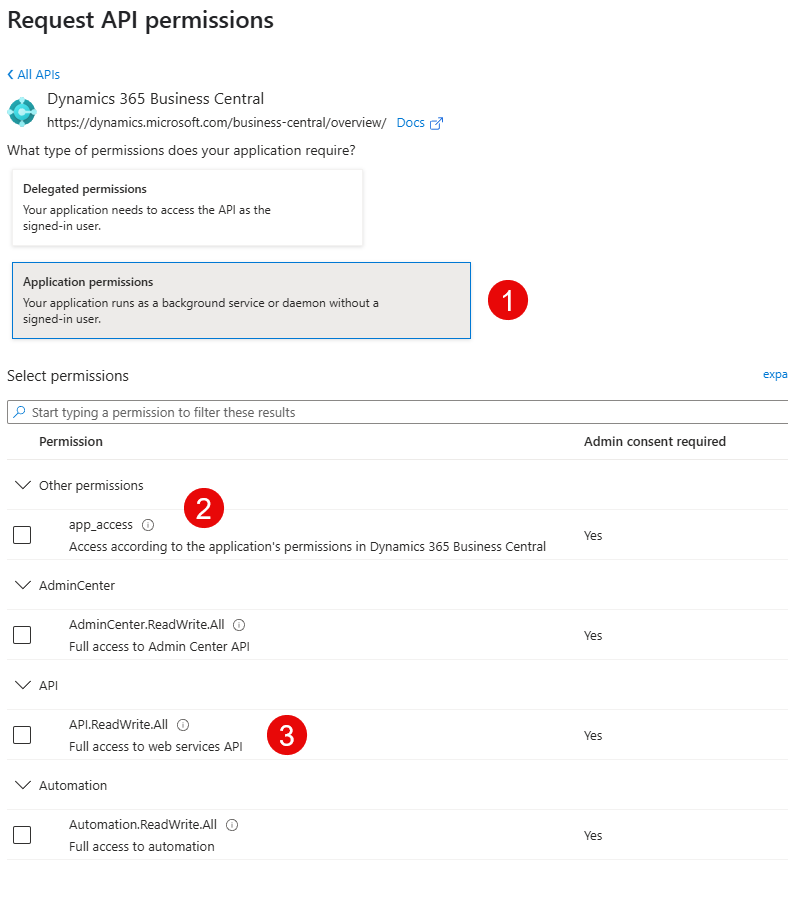
The minimum required types for permission are “app_access” (to be able to authenticate) and “API.ReadWrite.All” (to be able to get the package references, download packages, etc.) When finished press “Add permissions” to go back to the main screen:
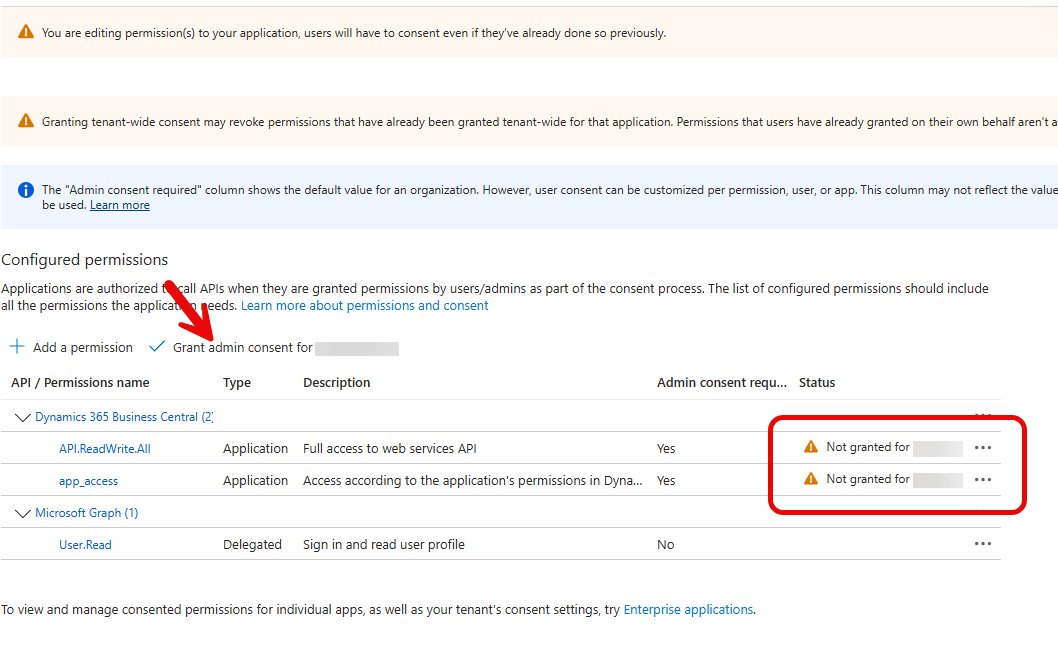
If the area highlighted in the screenshot show the exclamation mark (as shown) the administrator must grant admin consent by pressing the button at the arrow. This will open a confirmation screen:

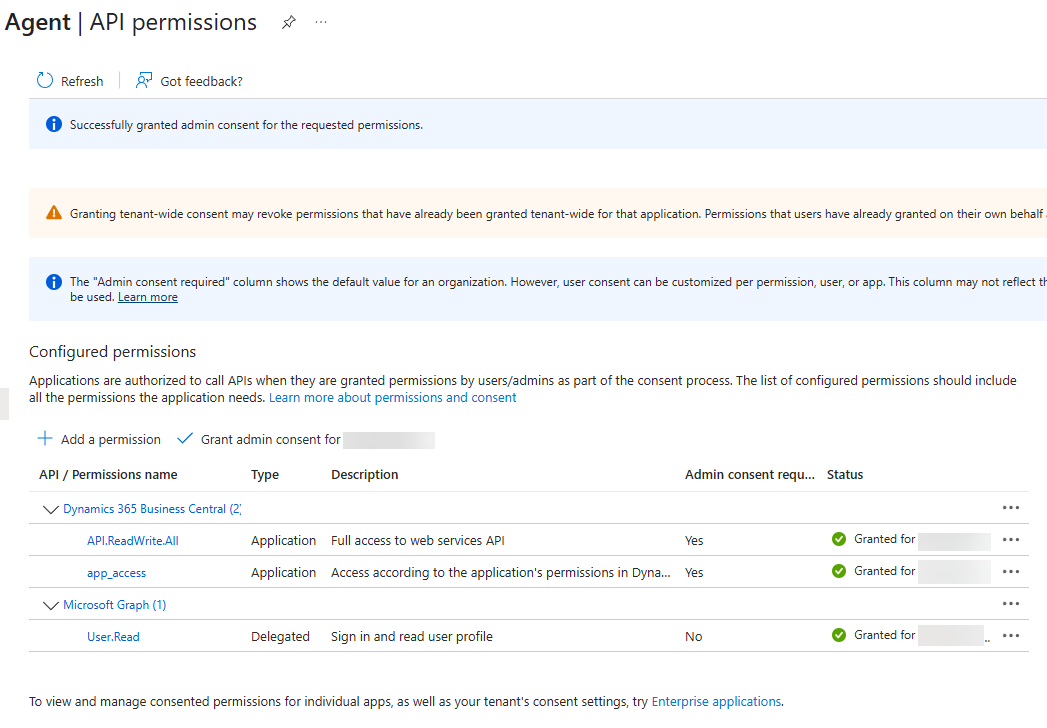
When this is complete, there should be green checkmarks in the status column:
Business Central Configuration
A user must be set up in Business Central to allow the pipeline agent to communicate with it. Select the magnifying glass and search on “Entra”:
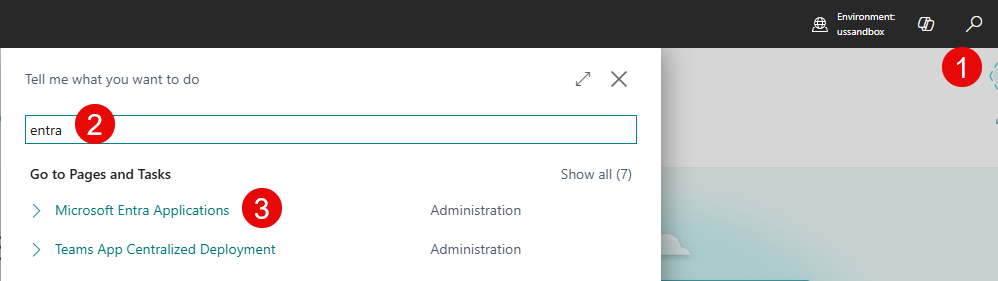
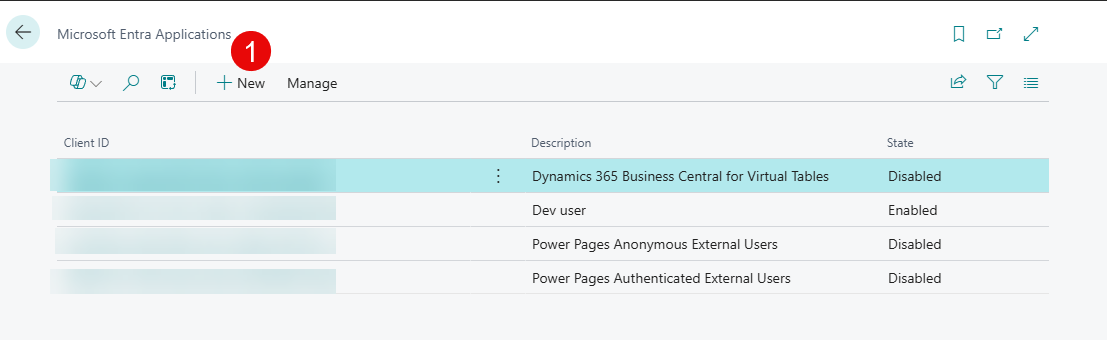
Select “Microsoft Entra Applications” to come to this screen and select “New”:
Fill in the client id (from Entra) and provide a descriptive name:
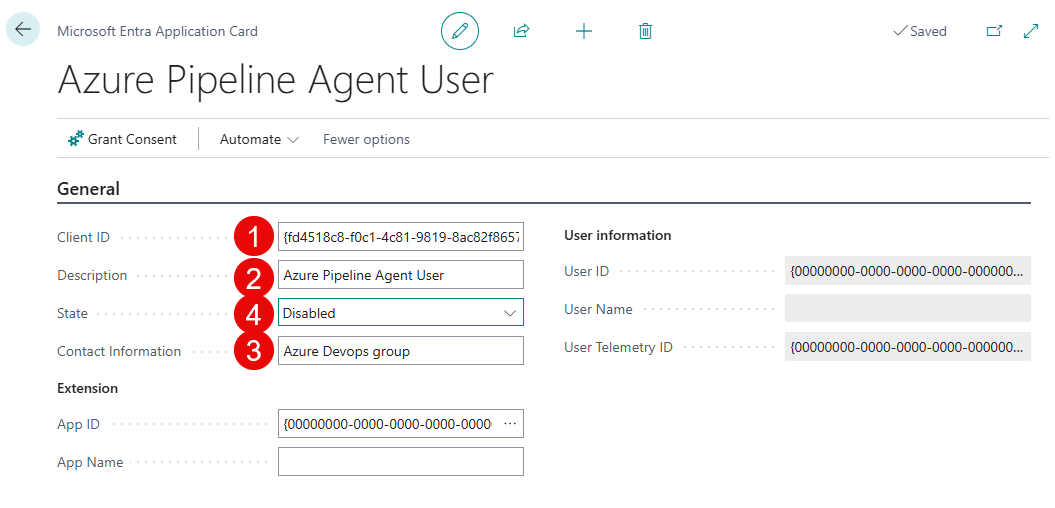
References:
- This is the
ClientIdfield, the one from the Entra registration; copy-paste it into this field to ensure accuracy. - A human-readable label—shown in BC when authenticating extensions via service-to-service (S2S) apps.
- This is the contact information for the account.
- before you move to the next step you must set this to “enabled”.
Once done, the bottom portion will be active:
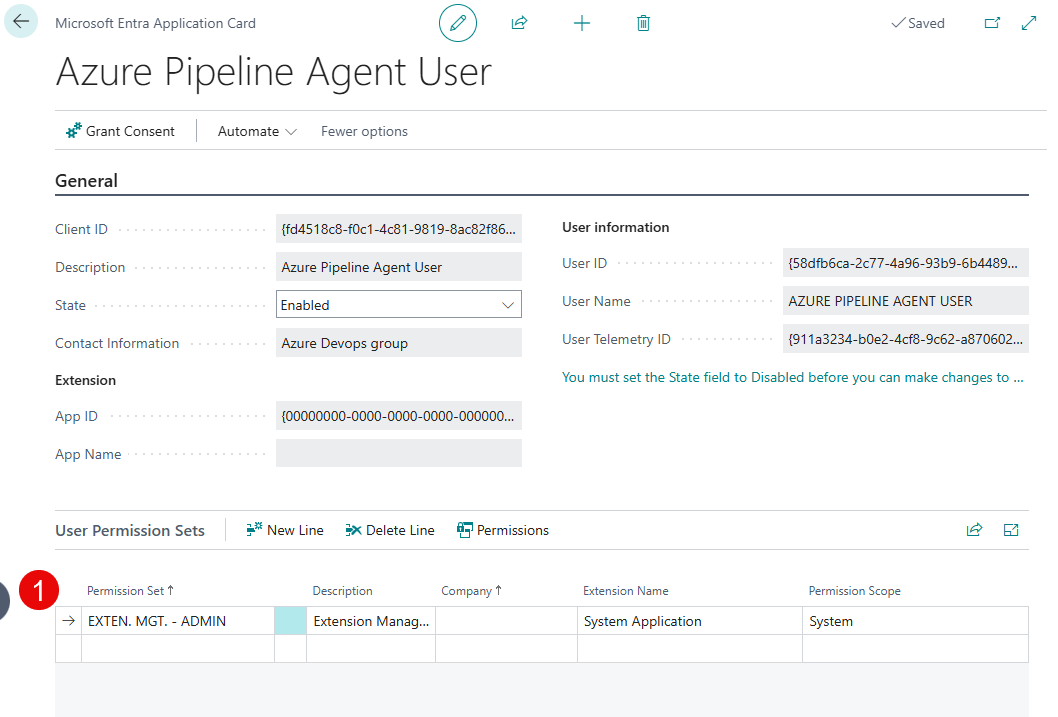
You want to provide this user with the out-of-the-box permission set EXTEN. MGT. - ADMIN. This is the minimum required to use this pipeline extension.
Setup Complete
Tasks Included
1. Get AL Compiler (EGGetALCompiler)
| Type | Name | Required | Default | Use |
|---|---|---|---|---|
| Input | DownloadDirectory | x | $(Build.ArtifactStagingDirectory) | The destination of the compiler; will expand into a folder called expanded |
| Input | TargetVersion | latest | Use a full specific version if you need it, i.e. 16.0.1463980, or to get the latest version, ignore this or put latest | |
| Output | alVersion | string | The version number of the extracted compiler | |
| Output | alPath | string | The path to the expanded\extension\bin folder that contains win32\alc.exe; used in later steps |
Notes:
If not using the alVersion variable from above, the system places the expanded archive in the $(DownloadDirectory)\expanded\extension\bin folder. (Technically it then goes one level lower, to the win32 folder or the linux folder.)
2. Get AL Dependencies (EGGetALDependencies)
| Type | Name | Required | Default | Use |
|---|---|---|---|---|
| Input | TenantId | x | N/A | The tenant id from Entra app credentials |
| Input | ClientId | x | N/A | The client id from Entra app credentials |
| Input | ClientSecret | x | N/A | The client secret from Entra app credentials |
| Input | EnvironmentName | sandbox | The environment name in Business Central | |
| Input | PathToAppJson | $(Build.SourcesDirectory)\app.json | The path to the app.json file | |
| Input | PathToPackagesDirectory | $(Build.SourcesDirectory)\.alpackages | The folder path to the output directory for packages. | |
| Input | SkipDefaultDependencies | false | Set to true this will skip the basic dependencies and load only what is in the app.json file | |
| Input | TestLoginOnly | false | Set to true to skip the dependency loading entirely and stop after authentication; useful for pipeline setup |
3. Build AL Package (EGALBuildPackage)
| Type | Name | Required | Default | Use |
|---|---|---|---|---|
| Input | EntireAppName | x | N/A | This is the versioned name of the app file desired, without the .app extension |
| Input | ProjectPath | x | $(Build.SourcesDirectory) | The top-level folder of the project; app.json must be available in this folder |
| Input | OutAppFolder | $(Build.ArtifactStagingDirectory) | The output location of the compiled app | |
| Input | PackageCachePath | $(Build.SourcesDirectory)\.alpackages | The folder containing the downloaded .app files for the project | |
| Input | ALEXEPathFolder | x | The location of the bin folder that contains win32\alc.exe; also the output of Get-VSIXCompiler |
4. Get List of Companies (EGGetBCCompanies)
| Type | Name | Required | Default | Use |
|---|---|---|---|---|
| Input | TenantId | x | N/A | The tenant id of the target Business Central to enumerate |
| Input | EnvironmentName | x | N/A | The environment name from the Business Central administration console for the target environment |
| Input | ClientId | x | N/A | The client id authorized to access the administrative API |
| Input | ClientSecret | x | N/A | The client secret for the client id authorized to access the administrative API |
5. Get List of Extensions (EGGetBCModules)
| Type | Name | Required | Default | Use |
|---|---|---|---|---|
| Input | TenantId | x | N/A | The tenant id of the target Business Central to enumerate |
| Input | EnvironmentName | x | N/A | The environment name from the Business Central administration console for the target environment |
| Input | ClientId | x | N/A | The client id authorized to access the extension deployment API |
| Input | ClientSecret | x | N/A | The client secret for the client id authorized to access the extension deployment API |
| Input | CompanyId | x | N/A | A company id (guid) is required to enumerate, however the response should be for the tenant; acquire a company id from EGGetBCCompanies above |
| Input | ModuleId | <blank> | To restrict the list of extensions to a single extension (perhaps the one being deployed), set this field to the guid of the extension | |
| Input | ExcludeMicrosoft | false | Set to true to return a list that doesn’t include extensions published by Microsoft; useful with large lists of extensions |
6. Publish Extension to Business Central (EGDeployBCModule)
This function is still somewhat experimental.
This function is intended to publish a compiled extension (.app file) to a Business Central tenant, and wait for a response. In its current form it has been demonstrated to create the extension upload and successfully call the publish routine (effectively code complete), however there are many external circumstances that may cause this step to fail.
Overall, the flow of operations is:
- Create an upload bookmark in the API
- Upload the actual
.appfile - Call a specific routine in the API
- Call the extension deployment status API until success
There is not much more control that is provided and even the response codes from the API do not provide enough information to determine problems, diagnose issues or troubleshoot.
| Type | Name | Required | Default | Use |
|---|---|---|---|---|
| Input | TenantId | x | N/A | The tenant id of the target Business Central to enumerate |
| Input | EnvironmentName | x | N/A | The environment name from the Business Central administration console for the target environment |
| Input | ClientId | x | N/A | The client id authorized to access the extension deployment API |
| Input | ClientSecret | x | N/A | The client secret for the client id authorized to access the extension deployment API |
| Input | CompanyId | x | N/A | A company id (guid) is required to enumerate, however the response should be for the tenant; acquire a company id from EGGetBCCompanies above |
| Input | AppFilePath | x | N/A | The full file name and path of the pre-compiled .app file |
| Input | SkipPolling | false | Set to true to skip polling; note that the pipeline will be subsequently unaware of the status of the upload | |
| Input | PollingFrequency | 10 | The number of seconds to wait between attempts to poll the extension deployment status for information after the upload | |
| Input | MaxPollingTimeout | 600 | The maximum number of seconds to stop the pipeline to wait for the result of the deployment status; note: use this value to prevent the pipeline from consuming too much time waiting for a response |
7. Enumerate Environment (EnumerateEnvironment)
This function returns information about the agent on which the pipeline is running for diagnostic and troubleshooting purposes. Included is:
- platform (windows or linux)
- whoami (user security context)
- current working directory
- Powershell version (if installed)
- pwsh version (if installed)
- BCContainerHelper version (if installed)
- docker version (if installed)
- list of docker images (if installed, and if any exist)
The output can be put to a file for consumption by later steps in the pipeline. The output file is a JSON file, with the following format:
{
  "platform": "string",
  "whoami": "string",
  "workingDirectory": "string",
  "powershellVersion": "string",
  "pscoreVersion": "string",
  "bcContainerVersion": "string",
  "dockerVersion": "string",
  "dockerImages": [
    {
      "name": "string",
      "status": "string"
    }
  ]
}
| Type | Name | Required | Default | Use |
|---|---|---|---|---|
| Input | FileNameAndPath | <blank> | Directs where to save the file if GenerateFile is true |
Example Pipeline
- task: EGGetALCompiler@0
  displayName: "Get AL compiler"
  inputs:
   DownloadDirectory: $(Build.SourcesDirectory)\compiler
   Version: 'latest'
   ExpansionDirectory: 'expanded'

- task: EGGetALDependencies@0
  displayName: "Get AL dependencies"
  inputs:
   ClientId: "<your client id>"
   ClientSecret: "<your client secret>"
   EnvironmentName: '<your environment name>'
   PathToAppJson: $(Build.SourcesDirectory)\CodeModule
   PathToPackagesDirectory: $(Build.SourcesDirectory)\.alpackages
   TenantId: "<your tenant id>"

- task: EGBuildALPackage@0
  displayName: "Compile AL package"
  inputs:
    ALEXEPathFolder: $(Build.SourcesDirectory)/compiler/expanded/extension/bin/win32/alc.exe
    EntireAppName: "TestApp.1.1.1.app"
    OutAppFolder: $(Build.ArtifactStagingDirectory)
    PackageCachePath: $(Build.SourcesDirectory)\.alpackages
    ProjectPath: $(Build.SourcesDirectory)\CodeModule

- task: PublishBuildArtifacts@1
  displayName: "Publish artifact"
  inputs:
    ArtifactName: "drop"
    PathtoPublish: $(Build.ArtifactStagingDirectory)

- task: EGDeployBCModule@0
  displayName: "Deploy module to Business Central"
  inputs:
    TenantId: "<target tenant id>"
    EnvironmentName: "<target environment name>"
    ClientId: "<target-capable client id>"
    ClientSecret: "<target-capable client secret>"
    CompanyId: "<company id>"
    AppFilePath: "$(Build.ArtifactStagingDirectory)\\TestApp.1.1.1.app"

- task: EGGetBCCompanies@0
  displayName: "Getting list of companies"
  inputs:
    TenantId: "<target tenant id>"
    EnvironmentName: "<target environment name>"
    ClientId: "<target-capable client id>"
    ClientSecret: "<target-capable client secret>"

- task: EGGetBCModules@0
  displayName: "Getting list of modules installed"
  inputs:
    TenantId: "<target tenant id>"
    EnvironmentName: "<target environment name>"
    ClientId: "<target-capable client id>"
    ClientSecret: "<target-capable client secret>"
    CompanyId: "<company id>"

- task: EGEnumerateEnvironment@0
  displayName: "Enumerate environment"
  inputs:
    FileNameAndPath: ./environment.json
Common Failures
Here are some common failures and their likely causes:
| Failure | Cause | Corrective Action |
|---|---|---|
| Immediate fail on deploy | An immediate failure often means the extension’s version number hasn’t changed. Business Central may retain internal metadata even if the extension was unpublished and removed. This can cause silent rejections during re-deploy. To confirm, try a manual upload — the web interface will usually surface an error message that the API silently swallows. | Increment build number in app.json. |
| Extension never installs / stuck in “InProgress” | Business Central backend is overloaded or stalled (e.g., schema sync issues, queued deployments). | Increase PollingTimeout and check the BC admin center for other queued extensions or backend delays. |
| Extension fails with no visible error message | The BC API may suppress detailed errors. Often due to invalid dependencies, permission errors, or duplicate version conflicts. | Try uploading the extension manually through the BC UI to surface hidden error messages. |
| Authentication fails | Incorrect or expired ClientSecret; or app registration missing permissions. | Ensure app has Application permissions, API.ReadWrite.All, and admin consent granted. Rotate secret if expired. |
| Upload succeeds (204) but deployment never completes | 204 means “upload accepted”, not “installed”. Backend may not trigger processing. | Let polling run. If it never transitions, retry Microsoft.NAV.upload call or re-check bookmark. |
| Multiple extension versions appear in BC | Business Central retains ghost entries if version number isn’t changed. | Always increment the version number (1.0.0.x) for every build. |
Pipeline fails to find app.json | Folder structure doesn’t match expected default; PathToAppJson may be incorrect. | Confirm folder layout. Use an inline ls or echo step to validate paths before running. |
| Polling hangs until timeout | Deployment didn’t register; call to Microsoft.NAV.upload may have silently failed. | Recheck that upload succeeded and bookmark is valid. Consider increasing logging verbosity. |
| ENOENT / ETAG errors during upload | Missing .app file or stale @odata.etag from a previous upload attempt. | Confirm Build Package step ran and .app file exists. If needed, reacquire a fresh bookmark with valid ETAG. |
500 Internal Server Error or "An error occurred while trying to download ''" during package download | The pipeline user may not have an entry in the Entra users in Business Central. | Add the pipeline user to the Entra users. |
Security & Trust
These tasks are designed for internal use and are provided under the Evergrowth publisher namespace. All task logic is exposed via wrapper scripts for transparency and audit. Source code is available on GitHub.
For production-grade installations, we recommend isolating usage to dedicated agents, applying RBAC at the pipeline level, and integrating with secure secret management (e.g., Azure Key Vault, or Azure Pipelines Library –> Variable Groups (Secrets)). We do not recommend checking in the ClientSecret into your repository.
Support
If you encounter any issues or require assistance, contact:
Evergrowth Consulting
Please open a GitHub issue at https://github.com/crazycga/bcdevopsextension/issues for queries or support.
License
Provided under the MIT License.