
DimLogic Documentation - API
API Documentation Glossary Reference
| Concept | Details | Reference |
|---|---|---|
| API Version | 2.0 | |
| Tenant identifier (Entra / Business Central) | {{tenantId}} | |
| Sandbox vs. Production identifiers | {{environmentName}} | |
| Company id | A guid representing the company system id (usually not available or obvious to front end users) | {{companyId}} |
| Company name | An url-encoded variant of the company name, i.e. CRONUS%20Canada%2C%20Inc. | {{companyName}} |
Postman Examples
| Type | Link |
|---|---|
| Environment | DimLogic_Template.postman_environment.json |
| Collection | DimLogic.postman_collection.json |
Overview
DimLogic has an API available that allows for create, modify, update and deletion of rules and rulesets. It also has the ability to evaluate the result of a dimension setting to test the system. This will allow for integrating programs to anticipate the actions of DimLogic. The API leverages the Microsoft Dynamics 365 Business Central native API scaffolding to handle authentication.
Permission Set [EVG DIMLOGIC API]
In order to configure the system for service to service, please see the Microsoft Learn article here:
MS Learn - Using service-to-service (S2S) authentication
Once the Entra user is set up, apply the security group EVG DIMLOGIC API to the Entra user in order to enable the service to use the API.
Configuration
In addition to the service configuration and Entra configuration, DimLogic allows you to granularly control what is exposed through DimLogic.
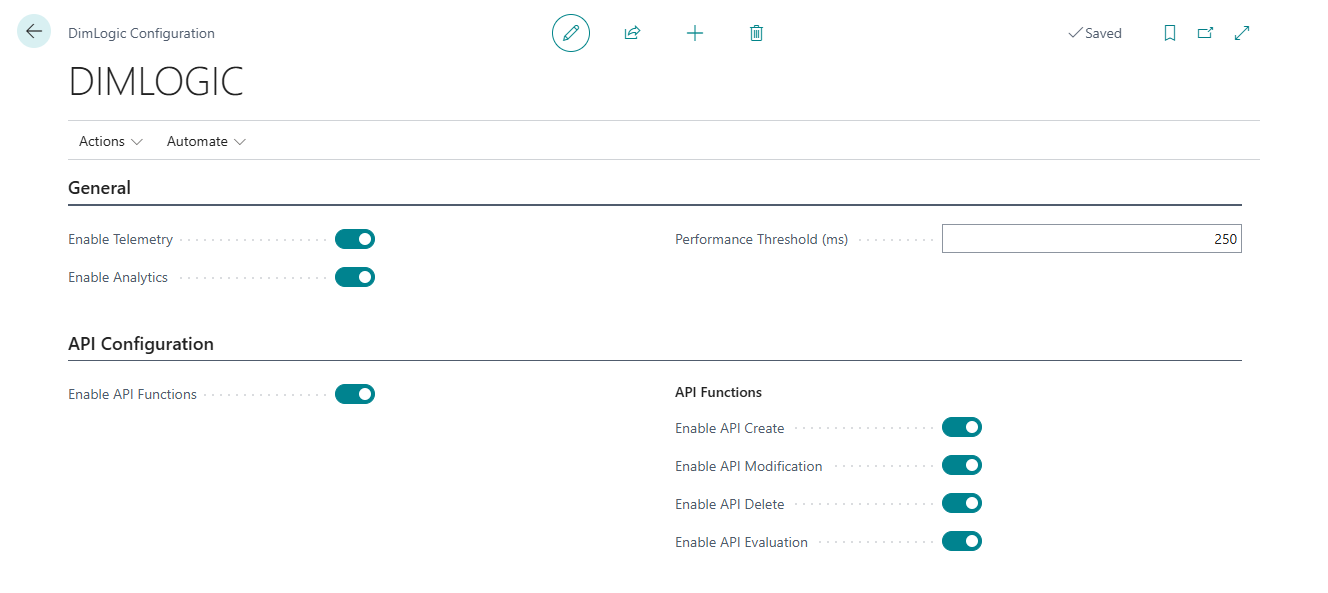
Enable API Functions: this setting will enable query mode only, and must be set to true (on) in order for any other functions to operate. This maps to read-only state for the API with no other settings turned on.
API Functions
Enable API Create: this setting will allow the API service to create DimLogic rules.
Enable API Modification: this setting will allow the API service to modify existing rules.
Enable API Delete: this setting will allow the API service to delete rules.
Enable API Evaluate: this setting will allow the API service to evaluate a payload to determine what the outcome will be if the payload were applied to DimLogic.
Note that deactivating the “Enable API Functions” setting will disable all other API functions.
Operations
Headers
Business Central’s API requires the following headers:
| Header | Type | Value |
|---|---|---|
| Authorization | String | Bearer <token> |
| Content-Type | String | application/json |
| If-Match | String | If interacting with an existing document (i.e. PATCH or DELETE) you must put the last @odata.etag value in this field (record-safe), or use If-Match * (cowboy variant; will not bother to match the record) |
Endpoints
The evaluation endpoint by definition is different from the operational endpoint for Business Central. The initial endpoint as specified by Microsoft for Business Central endpoints is:
| Location | Reference |
|---|---|
| Base Endpoint | https://api.businesscentral.dynamics.com/v2.0/{{tenantId}}/{{environmentName}} |
| Operation endpoints | /api/evergrowth/dimlogic/v2.0/companies({{companyId}}) |
| Evaluation endpoint | /ODataV4/dimlogicActions_Evaluate?company={{companyName}} |
Operational (query, insert, modify, delete) endpoints use the operation endpoint. Evaluate uses the evaluation endpoint.
| Operation | HTML Verb | Endpoint | Effect | Returns |
|---|---|---|---|---|
| Query rulesets | GET | /rulesets | Acquires list of all rule headers in DimLogic | Rulesets Query |
| Query individual ruleset | GET | /rulesets({{rulesetId}}) | Acquires single rule header in DimLogic based on rulesetId | Ruleset Query |
| Query individual ruleset lines | GET | /rulesets({{rulesetId}})/ruleDetails | Acquires all rule details associated with rule header referenced by rulesetId | |
| Query individual ruleset individual line | GET | /rulesets({{rulesetId}})/ruleDetails({{ruleLineId}}) | Acquires single rule detail referenced by ruleLineId of rule header rulesetId | |
| Insert ruleset | POST | /rulesets | Creates a DimLogic rule complete with lines based on payload | Ruleset Query |
| Modify rule header | PATCH | /rulesets({{rulesetId}}) | Modifies a rule header referenced by rulesetId | Ruleset Query |
| Modify rule detail | PATCH | /rulesets({{rulesetId}})/ruleDetails({{ruleLineId}}) | Modifies a rule detail line referenced by ruleLineId for of rule header rulesetId | |
| Remove rule | DELETE | /rulesets({{rulesetId}}) | Deletes the rule referenced by rulesetId | 204 No Content |
| Evaluate rule | POST | Evaluation endpoint; parameter company set to url encoded company name | Returns a list of the dimensions to be suggested by DimLogic based on the payload |
Examples:
| Action | Verb | Sample |
|---|---|---|
| Query rulesets | GET | https://api.businesscentral.dynamics.com/v2.0/{{tenantId}}/{{environmentName}}/api/evergrowth/dimlogic/v2.0/companies({{companyId}})/rulesets |
| Query individual ruleset | GET | https://api.businesscentral.dynamics.com/v2.0/{{tenantId}}/{{environmentName}}/api/evergrowth/dimlogic/v2.0/companies({{companyId}})/rulesets(9e55cf42-ad02-f111-8405-0022483bf831) |
| Query individual ruleset lines | GET | https://api.businesscentral.dynamics.com/v2.0/{{tenantId}}/{{environmentName}}/api/evergrowth/dimlogic/v2.0/companies({{companyId}})/rulesets(e5d66c5e-1905-f111-8405-0022483e7497)/ruleDetails |
| Insert ruleset | POST | https://api.businesscentral.dynamics.com/v2.0/{{tenantId}}/{{environmentName}}/api/evergrowth/dimlogic/v2.0/companies({{companyId}})/rulesets |
| Modify rule header | PATCH | https://api.businesscentral.dynamics.com/v2.0/{{tenantId}}/{{environmentName}}/api/evergrowth/dimlogic/v2.0/companies({{companyId}})/rulesets(a3a40fc4-2601-f111-8405-7c1e528ce16c) |
| Module rule detail | PATCH | https://api.businesscentral.dynamics.com/v2.0/{{tenantId}}/{{environmentName}}/api/evergrowth/dimlogic/v2.0/companies({{companyId}})/rulesets(a3a40fc4-2601-f111-8405-7c1e528ce16c)/ruleDetails(a5a40fc4-2601-f111-8405-7c1e528ce16c) |
| Remove rule | DELETE | https://api.businesscentral.dynamics.com/v2.0/{{tenantId}}/{{environmentName}}/api/evergrowth/dimlogic/v2.0/companies({{companyId}})/rulesets(264ad0e5-cd03-f111-8405-002248b38831) |
| Evaluate rule | POST | https://api.businesscentral.dynamics.com/v2.0/{{tenantId}}/{{environmentName}}/ODataV4/dimlogicActions_Evaluate?company=CRONUS%20Canada%2C%20Inc. |
Payloads
Operation Payload(s)
At current time, the only scopes available in dimLogicScope are:
| DimLogic Scope Name |
|---|
All |
GeneralJournal |
Purchases |
Sales |
In all cases of “String” data type below, note that Business Central will capitalize the string. (All strings convert to a Business Central datatype of Code[n].)
| Name | Parent | DataType | MaxLength | Usage |
|---|---|---|---|---|
ruleId | String | 20 | Specifies the rule id. Note that Business Central will capitalize this value. | |
parentControlDimension | String | 20 | Specifies the controlling dimension code. | |
controllingValueCode | String | 20 | Specifies the dimension value that triggers the rule. | |
dimLogicScope | dimLogicScope | N/A | Specifies the scope to which the DimLogic rule applies; see DimLogic scope names above. | |
ruleDetails | Array of rule objects | N/A | inserts only: this array contains all of the rule lines for a DimLogic ruleset. | |
dimensionCode | ruleDetails | String | 20 | Specifies the dimension code of a rule detail. |
dimensionValue | ruleDetails | String | 20 | Specifies the dimension value of the code for the rule detail. |
An example payload for a deep insert of a new ruleset is as follows:
{
	"ruleId": "RULETWO",
	"parentControlDimension": "AREA",
	"controllingValueCode": "60",
	"dimLogicScope": "All",
	"ruleDetails": [
		{
			"dimensionCode": "BUSINESSGROUP",
			"dimensionValue": "INDUSTRIAL"
		},
		{
			"dimensionCode": "CUSTOMERGROUP",
			"dimensionValue": "SMALL"
		}
	]
}
In order to accomplish an update for rulesets (rule header) the payload example is:
{
	"ruleId": "RULETWO",
	"parentControlDimension": "AREA",
	"controllingValueCode": "60",
	"dimLogicScope": "GeneralJournal"
}
Detail updates for specific rules can be made using this example:
{
    "dimensionValue": "MEDIUM"
}
Operation Response(s)
The operation responses are dictated in large part by Business Central. The resulting JSON objects adhere to Business Central’s return types.
Rulesets Query
| Name | Parent | DataType | Usage |
|---|---|---|---|
@odata.context | String | Business Central provided link to record result | |
value | Array of ruleHeader | The actual values of the return | |
@odata.etag | value | String | The OData tag of the document; required for interaction with the document |
systemId | value | String (Guid) | The Business Central system id assigned to the record |
ruleId | value | String (Code[20]) | The rule id of the rule header |
parentControlDimension | value | String (Code[20]) | The trigger (control) dimension of the rule |
controllingValueCode | value | String (Code[20]) | The trigger (control) dimension value of the rule |
dimLogicScope | value | dimLogicScope | The scope of the rule |
active | value | Boolean | Active flag of the rule |
invocationCount | value | Integer | The number of times that the rule has been executed; read only |
versionNo | value | Integer | The version number of the rule; read only |
versionTimestampUTC | value | String (DateTime) | UTC timestamp of the creation (unused at this time} |
modifiedBy | value | String | User name of last modification (unused at this time) |
modifiedOnUTC | value | String (DateTime) | UTC timestamp of the last modification (unused at this time) |
Example
{
    "@odata.context": "https://api.businesscentral.dynamics.com/v2.0/{{tenantId}}/{{environmentName}}/api/evergrowth/dimlogic/v2.0/$metadata#companies({{companyId}})/rulesets",
    "value": [
        {
            "@odata.etag": "W/\"JzIwOzE1MTg3ODk3NjUxOTAyNTAyNzk5MTswMDsn\"",
            "systemId": "9e55cf42-ad02-f111-8405-0022483bf831",
            "ruleId": "RULEONE",
            "parentControlDimension": "AREA",
            "controllingValueCode": "70",
            "dimLogicScope": "All",
            "active": true,
            "invocationCount": 22,
            "versionNo": 0,
            "versionTimestampUTC": "0001-01-01T00:00:00Z",
            "modifiedBy": "",
            "modifiedOnUTC": "0001-01-01T00:00:00Z"
        }
    ]
}
Ruleset Query (singleton)
| Name | Parent | DataType | Usage |
|---|---|---|---|
@odata.context | String | Business Central provided link to record result | |
@odata.etag | String | The OData tag of the document; required for interaction with the document | |
systemId | String (Guid) | The Business Central system id assigned to the record | |
ruleId | String (Code[20]) | The rule id of the rule header | |
parentControlDimension | String (Code[20]) | The trigger (control) dimension of the rule | |
controllingValueCode | String (Code[20]) | The trigger (control) dimension value of the rule | |
dimLogicScope | dimLogicScope | The scope of the rule | |
active | Boolean | Active flag of the rule | |
invocationCount | Integer | The number of times that the rule has been executed; read only | |
versionNo | Integer | The version number of the rule; read only | |
versionTimestampUTC | String (DateTime) | UTC timestamp of the creation (unused at this time} | |
modifiedBy | String | User name of last modification (unused at this time) | |
modifiedOnUTC | String (DateTime) | UTC timestamp of the last modification (unused at this time) |
Example
{
    "@odata.context": "https://api.businesscentral.dynamics.com/v2.0/{{tenantId}}/{{environmentName}}/api/evergrowth/dimlogic/v2.0/$metadata#companies({{companyId}})/rulesets/$entity",
    "@odata.etag": "W/\"JzIwOzE1MTg3ODk3NjUxOTAyNTAyNzk5MTswMDsn\"",
    "systemId": "9e55cf42-ad02-f111-8405-0022483bf831",
    "ruleId": "RULEONE",
    "parentControlDimension": "AREA",
    "controllingValueCode": "70",
    "dimLogicScope": "All",
    "active": true,
    "invocationCount": 22,
    "versionNo": 0,
    "versionTimestampUTC": "0001-01-01T00:00:00Z",
    "modifiedBy": "",
    "modifiedOnUTC": "0001-01-01T00:00:00Z"
}
Rule lines query
| Name | Parent | DataType | Usage |
|---|---|---|---|
@odata.context | String | Business Central provided link to record result | |
value | Array of ruleLines | The actual values of the return | |
@odata.etag | value | String | The OData tag of the document; required for interaction with the document |
ruleId | value | String (Guid) | The rule header system id of the line |
id | value | String (Guid) | The rule line system id of the line |
headerNo | value | String (Code[20]) | The rule header id of the ruleset for which the line belongs |
headerId | value | String (Guid) | The rule header system id of the line (duplication of ruleId above; unavoidable due to the operation of deep inserts) |
dimensionCode | value | String (Code[20]) | The rule line dimension code to be set |
dimensionValue | value | String (Code[20]) | The rule line dimension value to be set |
active | value | Boolean | Indicates active flag of rule line; currently unused |
modifiedBy | value | String | Name of user who last modified the rule line |
modifiedUTC | value | String (DateTime) | UTC timestamp of the last modification (unused at this time) |
Example
{
    "@odata.context": "https://api.businesscentral.dynamics.com/v2.0/{{tenantId}}/{{environmentName}}/api/evergrowth/dimlogic/v2.0/$metadata#companies({{companyId}})/rulesets({{rulesetId}})/ruleDetails",
    "value": [
        {
            "@odata.etag": "W/\"JzIwOzE2MzcxNjY0NTgyMTQxNDEwMTI3MTswMDsn\"",
            "ruleId": "e6d66c5e-1905-f111-8405-0022483e7497",
            "id": "e6d66c5e-1905-f111-8405-0022483e7497",
            "headerNo": "RULETWO",
            "headerId": "e5d66c5e-1905-f111-8405-0022483e7497",
            "dimensionCode": "BUSINESSGROUP",
            "dimensionValue": "INDUSTRIAL",
            "active": true,
            "modifiedBy": "",
            "modifiedUTC": "0001-01-01T00:00:00Z"
        },
        {
            "@odata.etag": "W/\"JzE5Ozg3MTg4OTkwNTUwNjE2NDk4OTQxOzAwOyc=\"",
            "ruleId": "e7d66c5e-1905-f111-8405-0022483e7497",
            "id": "e7d66c5e-1905-f111-8405-0022483e7497",
            "headerNo": "RULETWO",
            "headerId": "e5d66c5e-1905-f111-8405-0022483e7497",
            "dimensionCode": "CUSTOMERGROUP",
            "dimensionValue": "SMALL",
            "active": true,
            "modifiedBy": "",
            "modifiedUTC": "0001-01-01T00:00:00Z"
        }
    ]
}
Evaluation payload
| Name | Parent | DataType | MaxLength | Usage |
|---|---|---|---|---|
dimensionCode | String | 20 | Specifies the evaluation dimension code to check. | |
dimensionValue | String | 20 | Specifies the evaluation dimension code value to check. |
{
    "dimensionCode": "AREA",
    "dimensionValue": "70"
}
Evaluation Response
| Name | Parent | DataType | Usage |
|---|---|---|---|
odata.context | String | Business Central provided link to record result | |
value | String | JSON encoded data package; this is Business Central’s normal operation for data responses from codeunits | |
dimensions | value | Array of evaluationPayload | This array is contained inside the value as JSON encoded text |
dimensionCode | value.Array | This is the dimension code of the response to the evaluation | |
dimensionValue | value.Array | This is the dimension value of the response to the evaluation |
Example
Raw response:
{
    "@odata.context": "https://api.businesscentral.dynamics.com/v2.0/{{tenantId}}/{{environmentName}}/ODataV4/$metadata#Edm.String",
    "value": "{\"dimensions\":[{\"dimensionCode\":\"AREA\",\"dimensionValue\":\"70\"},{\"dimensionCode\":\"BUSINESSGROUP\",\"dimensionValue\":\"INDUSTRIAL\"},{\"dimensionCode\":\"CUSTOMERGROUP\",\"dimensionValue\":\"LARGE\"}]}"
}
Parsed response after extracting coded JSON from value:
{
	"dimensions": [
		{
			"dimensionCode": "AREA",
			"dimensionValue": "70"
		},
		{
			"dimensionCode": "BUSINESSGROUP",
			"dimensionValue": "INDUSTRIAL"
		},
		{
			"dimensionCode": "CUSTOMERGROUP",
			"dimensionValue": "LARGE"
		}
	]
}